11. ProgressBar
The Gtk.ProgressBar is typically used to display the progress of a
long running operation. It provides a visual clue that processing is underway.
The Gtk.ProgressBar can be used in two different modes: percentage
mode and activity mode.
When an application can determine how much work needs to take place (e.g. read
a fixed number of bytes from a file) and can monitor its progress, it can use
the Gtk.ProgressBar in percentage mode and the user sees a growing
bar indicating the percentage of the work that has been completed.
In this mode, the application is required to call Gtk.ProgressBar.set_fraction()
periodically to update the progress bar, passing a float between 0 and 1 to provide
the new percentage value.
When an application has no accurate way of knowing the amount of work to do, it
can use activity mode, which shows activity by a block moving back and forth
within the progress area. In this mode, the application is required to call
Gtk.ProgressBar.pulse() periodically to update the progress bar.
You can also choose the step size, with the Gtk.ProgressBar.set_pulse_step()
method.
By default, Gtk.ProgressBar is horizontal and left-to-right, but you
can change it to a vertical progress bar by using the
Gtk.ProgressBar.set_orientation() method. Changing the direction the
progress bar grows can be done using Gtk.ProgressBar.set_inverted().
Gtk.ProgressBar can also contain text which can be set by calling
Gtk.ProgressBar.set_text() and Gtk.ProgressBar.set_show_text().
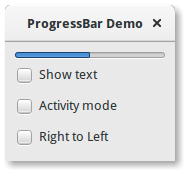
11.1. Example
 1import gi
 2
 3gi.require_version("Gtk", "3.0")
 4from gi.repository import Gtk, GLib
 5
 6
 7class ProgressBarWindow(Gtk.Window):
 8    def __init__(self):
 9        super().__init__(title="ProgressBar Demo")
10        self.set_border_width(10)
11
12        vbox = Gtk.Box(orientation=Gtk.Orientation.VERTICAL, spacing=6)
13        self.add(vbox)
14
15        self.progressbar = Gtk.ProgressBar()
16        vbox.pack_start(self.progressbar, True, True, 0)
17
18        button = Gtk.CheckButton(label="Show text")
19        button.connect("toggled", self.on_show_text_toggled)
20        vbox.pack_start(button, True, True, 0)
21
22        button = Gtk.CheckButton(label="Activity mode")
23        button.connect("toggled", self.on_activity_mode_toggled)
24        vbox.pack_start(button, True, True, 0)
25
26        button = Gtk.CheckButton(label="Right to Left")
27        button.connect("toggled", self.on_right_to_left_toggled)
28        vbox.pack_start(button, True, True, 0)
29
30        self.timeout_id = GLib.timeout_add(50, self.on_timeout, None)
31        self.activity_mode = False
32
33    def on_show_text_toggled(self, button):
34        show_text = button.get_active()
35        if show_text:
36            text = "some text"
37        else:
38            text = None
39        self.progressbar.set_text(text)
40        self.progressbar.set_show_text(show_text)
41
42    def on_activity_mode_toggled(self, button):
43        self.activity_mode = button.get_active()
44        if self.activity_mode:
45            self.progressbar.pulse()
46        else:
47            self.progressbar.set_fraction(0.0)
48
49    def on_right_to_left_toggled(self, button):
50        value = button.get_active()
51        self.progressbar.set_inverted(value)
52
53    def on_timeout(self, user_data):
54        """
55        Update value on the progress bar
56        """
57        if self.activity_mode:
58            self.progressbar.pulse()
59        else:
60            new_value = self.progressbar.get_fraction() + 0.01
61
62            if new_value > 1:
63                new_value = 0
64
65            self.progressbar.set_fraction(new_value)
66
67        # As this is a timeout function, return True so that it
68        # continues to get called
69        return True
70
71
72win = ProgressBarWindow()
73win.connect("destroy", Gtk.main_quit)
74win.show_all()
75Gtk.main()